COAWST-SCS
From wave–current processes to coupled coastal dynamics
and non-tidal water-level extremes
NUS-CCL · Computational Coastal Lab
National University of Singapore
Overview
Wave–current interactions can substantially modify coastal water levels during tropical cyclones (TCs), yet their collective, bidirectional effects on non-tidal extremes remain poorly understood. COAWST-SCS, a South China Sea application of the Coupled Ocean–Atmosphere–Wave–Sediment Transport (COAWST) modeling system, investigates these effects through coupled simulations and controlled process-isolation experiments.
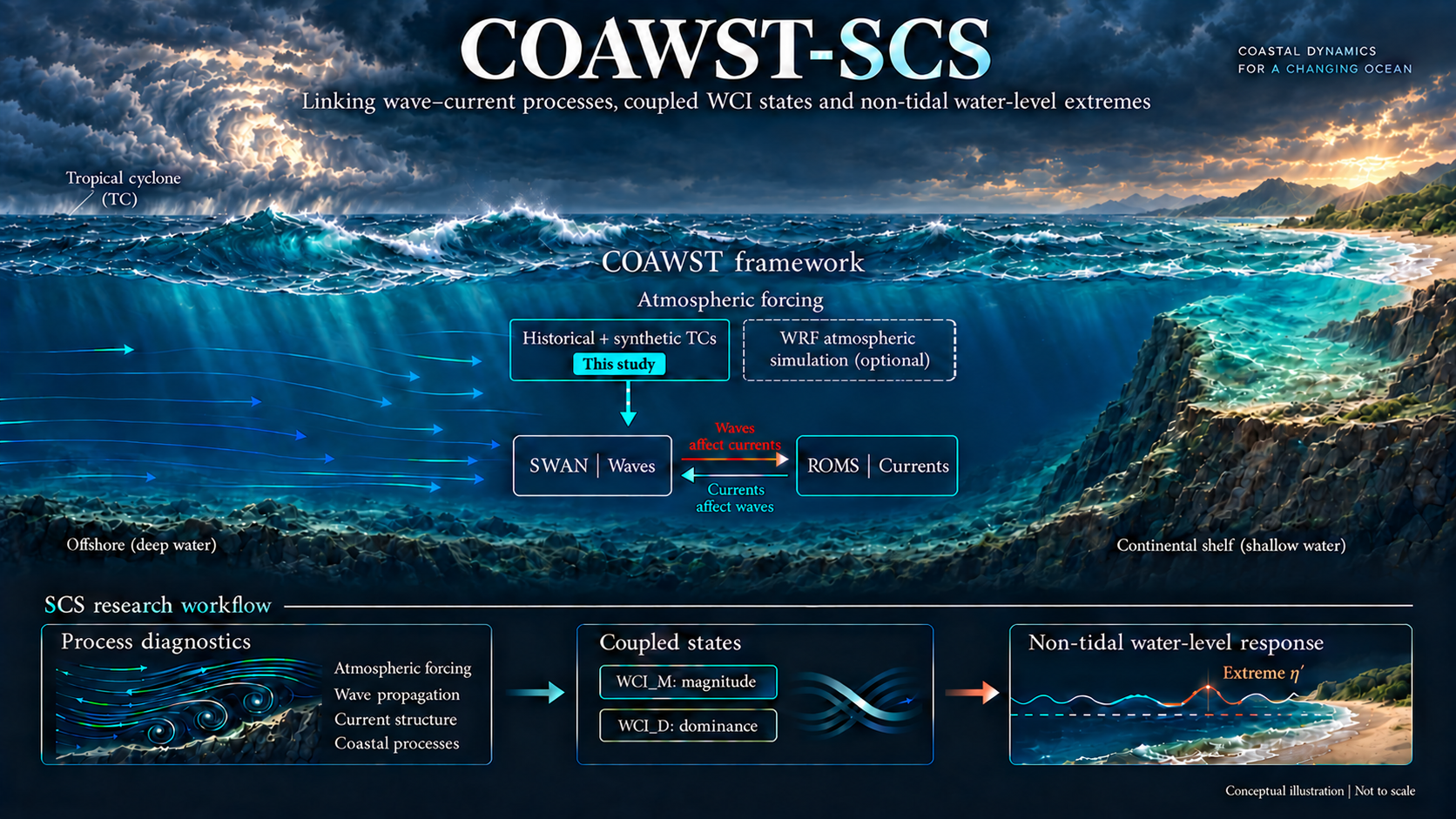
Research Workflow
 01
Define coupled states
Relate current-speed and wave-height responses to WCI and non-tidal water levels.
 02
Resolve dynamical processes
Native diagnostics, equivalent scales, configuration contrasts and residual proxies.
 03
Identify environmental structure
Separate process activity, reconstruction importance and response associations.
 04
Compare spatial settings
Examine terrain contrasts, high-response locations and distant coastal analogues.
Why the Name?
COAWST-SCS is built on the COAWST modeling framework to investigate wave–current coupling and non-tidal water-level responses in the South China Sea. COAWST is developed by USGS and its contributors; SCS denotes our South China Sea case implementation and research workflow.
Key Features
ROMS–SWAN case configuration for a South China Sea application.
Process-level activity and response diagnostics, with explicit distinctions between native terms, configuration contrasts and residual proxies.
WCI_M and WCI_D for complementary descriptions of coupling magnitude and directional dominance.
Python analysis and plotting source, with available derived data stored in the repository.
Local build and MPI execution instructions; no browser-based model execution.
Official Resources
The following resources are maintained by USGS or the official COAWST project. External links require an internet connection.
Official COAWST Website — USGS
COAWST Components & Environment
The instructions below are project-authored notes based on the local configuration and official repository guidance.
Local Model & Reproducibility
A local Linux / WSL2 environment is required. Model execution is not available in the browser.
 01
Prepare the toolchain
Configure GNU Fortran, MPI, NetCDF and MCT in a separate Linux environment.
 02
Configure the case
Set headers, paths, grids, initial and boundary conditions, and forcing.
 03
Compile and smoke-test
Validate official examples before building and testing the adapted CPL-0 case.
 04
Validate the simulation
Check logs, time axes, data validity and coupling exchange before analysis.
Getting Started
This is a local modeling workflow. The reviewed local source identifies itself as COAWST 3.8; the current upstream README identifies 3.9. Use a consistent source revision, compiler and library stack. This package is not a complete one-command reproduction of all manuscript experiments.
1. Model Environment (Linux / WSL2 · APT)
For compiling and running COAWST. To redraw the packaged figures only, use the separate Python / Conda environment.
The inspected local stack is Ubuntu 22.04.5 on WSL2, GNU Fortran 11.4.0, OpenMPI 4.1.2, NetCDF-C 4.8.1 and NetCDF-Fortran 4.5.4. MCT must also be built and configured for the selected model revision. Coupled grids may require SCRIP weights. A Python or Conda environment does not replace this compiled-model toolchain.
Run setup commands only in your own Linux workspace, never in the original research project or an existing production case:
sudo apt update
sudo apt install build-essential gfortran cmake git perl csh tcsh m4 \
  openmpi-bin libopenmpi-dev libnetcdf-dev libnetcdff-dev netcdf-bin \
  libhdf5-dev libhdf5-openmpi-dev
mkdir -p ~/model/src ~/model/projects ~/model/runs ~/model/logs
git clone https://github.com/DOI-USGS/COAWST.git ~/model/src/COAWST
git -C ~/model/src/COAWST checkout 015bb31f138285d399d30b82f50332ce2b477203
These commands install base packages and obtain the source; they are not a complete installation. Follow the manual for the selected revision to build MCT and configure compiler, MPI, NetCDF and MCT paths. Validate the official Upwelling and Inlet_test Coupled examples before adapting the SCS case.
2. Prepare the SCS Case
Extract the CPL-0 configuration package into a separate workspace, for example ~/model/projects/H1P2/CPL-0.
| File | Purpose |
| scs_couple.h | Application CPP header: model components and physical-process switches |
| ana_fsobc.h / ana_sediment.h | Analytical boundary or parameter routines, enabled conditionally |
| coawst.bash | Locally adapted build entry point |
| build_coawst_H1P2_CPL0_wsl.sh | Case-specific build script |
| coupling_scs.in | Component process counts, input files and coupling weights |
| scs_roms.in | Ocean grid, time stepping, initial/boundary/forcing files and outputs |
| scs_swan.in | Wave grid, spectrum, forcing and simulation period |
| scs_roms_sta.in | Station configuration |
Grid, initial-condition, boundary, atmospheric-forcing and coupling-weight files must be prepared separately. These large inputs are not distributed here. The copied configuration retains machine-specific paths for traceability and cannot be run immediately after extraction.
3. Configure Headers and Build Paths
The application name is SCS_COUPLE and its header is scs_couple.h. The inspected header enables ROMS_MODEL, SWAN_MODEL and MCT_LIB. Process switches include WEC_VF, WAVE_MIXING, SURFACE_STREAMING, BOTTOM_STREAMING, UV_ADV, DJ_GRADPS and GLS_MIXING; interpret each in the context of the selected model revision.
Adapt the following settings inside your copy of the build script:
export COAWST_APPLICATION=SCS_COUPLE
export MY_ROOT_DIR="$HOME/model/src/COAWST"
export MY_PROJECT_DIR="$HOME/model/projects/H1P2/CPL-0"
export MY_HEADER_DIR="$MY_PROJECT_DIR"
export MY_ANALYTICAL_DIR="$MY_PROJECT_DIR"
export BINDIR="$MY_PROJECT_DIR"
export SCRATCH_DIR="$MY_PROJECT_DIR/Build_roms"
Also verify FORT, MPI and library paths. An external export may be overridden by assignments inside the script. The supplied coawst.bash sources a machine-specific .bashrc_coawst: replace that reference with your own validated environment configuration. This file is not automatically supplied by COAWST.
4. Compile
cd ~/model/projects/H1P2/CPL-0
# Load your configured compiler/MPI/NetCDF/MCT environment first.
bash ./coawst.bash -j 2
# Alternatively, use the case-specific build script, not both:
# bash ./build_coawst_H1P2_CPL0_wsl.sh -j 2
The expected local executable is coawstM, not ./coawst. Rebuild appropriately after changing CPP headers or compiler options; do not mix incompatible old object files.
5. Run a Smoke Test, Then the Case
Before execution, check every input path, the smoke-test period and independent output filenames. The inspected coupling configuration uses NnodesOCN=9 and NnodesWAV=1, giving 10 MPI processes. ROMS tile decomposition must also match.
mpirun -np 10 ./coawstM coupling_scs_smoke.in
# Only after validation and confirming outputs cannot overwrite prior results:
mpirun -np 10 ./coawstM coupling_scs.in
Use mpirun from your configured PATH. Writing ./mpirun instead would refer to an executable in the current directory. Adjust process counts for other cases. Check exit status, completion logs, output time axes, valid values, coupling exchange and scientific validation; producing an output file alone does not establish a correct simulation.
Repository Contents GitHub ↗
Manuscript figures and their available plotting data are stored in the repository. The homepage presents a conceptual overview of the research framework.
README.md                  Project overview
index.html                 Project homepage
assets/                    Conceptual illustration and website assets
src/
├── coawst/                Local COAWST source archive
└── scs/                   SCS case scripts, headers and configurations
out/                       Approved figures and clean redraw packages
├── Fig01/
├── Fig02/
├── Fig03/
└── …
doc/                       Environment, compilation and execution notes
Downloads and Documentation
Standard scripts, headers and configurations
Main Research Outputs: Figures, Code and Data · Coming soon
Environment Setup and Execution
Model revision and file hashes
Development Team & Contact
Contributing authors: Yang SHI (yangshi@nus.edu.sg); Zhengyu HU (z.hu@u.nus.edu); Ying Min Low (ceelowym@nus.edu.sg); Yuzhu Pearl LI (pearl.li@nus.edu.sg)
Corresponding author: Yuzhu Pearl LI (pearl.li@nus.edu.sg)
Organization: National University of Singapore
Acknowledgements
The authors are grateful to the National Research Foundation of Singapore, PUB (Singapore’s National Water Agency) and the National University of Singapore for supporting this work done in the Coastal Protection and Flood Resilience Institute (CFI) Singapore under the Coastal Protection and Flood Management Research Programme (CFRP). We also extend our sincere appreciation to the PUB Coastal-Inland Flood Model (CIFM) team, whose technical insights and collaborative efforts greatly facilitated the development and refinement of the concept. The conclusions put forward in this publication reflect the views of the authors alone and not necessarily those of CFI Singapore or any of the supporting entities.
Copyright and License
Please follow the official COAWST citation guidance and the COAWST license, including the respective licenses of its components. This website documentation is licensed under CC BY 4.0.